
Peec AI review 2026: Quick summary
- My verdict: Peec AI is worth considering for SEO teams and agencies that want focused AI visibility insights and have the resources to act on them.
- Main strengths: Daily prompt tracking, competitor benchmarking, and domain- and URL-level source analysis help you understand where your brand appears and which sources support competitors.
- Beyond tracking: Actions prioritize content, outreach, and site-audit recommendations with supporting evidence and suggested briefs. GA4 integration adds AI referral reporting, with conversions and revenue available when configured.
- Starting price and limits: Starter costs $80/month billed annually for 50 prompts, three selected models, and one project. Additional models cost extra, so budget for the coverage you need.
- Main limitation: Recommendations help you decide what to do, but your team still needs to write, edit, publish, implement technical changes, and carry out outreach.
Your competitors keep appearing in AI answers, and you want to know where your brand stands. You're considering Peec AI, but another dashboard is only useful if it helps you decide what to do next.
Peec combines prompt tracking, competitor benchmarking, and source analysis with recommendations and content briefs. It can help you set priorities, while your team handles the content, outreach, and technical work.
This Peec AI review looks at the features, pricing, and limitations behind that decision. My focus is whether its insights and guidance justify the cost for the way your team actually works.
What Is Peec AI And How Does It Improve AI Visibility In 2026?
Peec AI is an AI visibility tracker that helps you understand how your brand shows up when people ask questions inside AI search platforms. Instead of looking only at Google rankings or organic traffic, it tracks prompts, mentions, sentiment analysis, answer position, source usage, and competitor presence.
What I like about Peec AI is that it makes AI visibility easier to read. You can quickly see which prompts mention your brand, which ones ignore you, which competitors keep showing up, and which sources AI platforms seem to trust. But I think it works best when your brand already has some search presence or category demand. If you are seeing LLM referrals in analytics or hearing customers mention ChatGPT or Perplexity, Peec AI becomes much more useful.
How Does Peec AI Help With AI Visibility?
- Prompt Performance: Peec AI helps you see which buyer questions mention your brand, which ones skip you, and where competitors are being recommended instead.
- Brand Visibility: It shows how often your brand appears across AI-generated answers, which is useful when you want to know whether your brand is actually part of the conversation.
- AI Answer Position: It helps you understand whether your brand appears near the top of an AI answer or gets pushed below competitors.
- Sentiment Signals: It shows whether AI platforms describe your brand positively, neutrally, or negatively, which matters because visibility without the right positioning can still hurt conversions.
- Source Usage: This is one of the more useful parts of Peec AI. You can see which websites, reviews, articles, communities, or third-party sources are shaping AI answers in your category.
- Competitor Presence: Peec AI helps you compare your brand against the companies showing up for the same prompts, so you are not looking at visibility in isolation.
What Do Recent Users Say About Peec AI?
The G2 reviews mostly match what I noticed while going through Peec AI: people like that it feels simple, focused, and easy to understand. This matters because AI visibility tracking can get messy very quickly. Peec AI does a good job of making prompts, sources, competitors, and visibility data feel less intimidating.
“I find Peec AI easy to use and fairly straightforward. It's the best tool for measuring how we show up in AI overviews and understanding how people are searching for us.”, says Riley M, Digital Marketing Strategist on G2
But the feedback also shows a clear limitation. Peec AI is strong at showing where your brand appears in AI search, but some users still want valuable insights into why AI platforms choose certain sources and how to extract those sources more easily.
As Grégoire d., Head of Growth, says on G2: “I’d love more insights about how LLMs pick their sources” and “an easier way to extract sources.”
Peec AI clearly gets the basics right, but the real question is how much depth those Peec.ai features offer once you start using the tool. Let’s break that down next.
Core Peec AI platform features: How Does Peec AI Help You Monitor AI Search Performance?
Peec AI is strongest when you use it for what it is clearly built to do: track how your brand appears in AI search. It gives you a clean way to look at prompts, visibility, sentiment, positions, mentions, sources, and competitors without making the dashboard feel too heavy.
After going through the platform, these are the Peec.ai features that stood out most to me:
1. Prompts
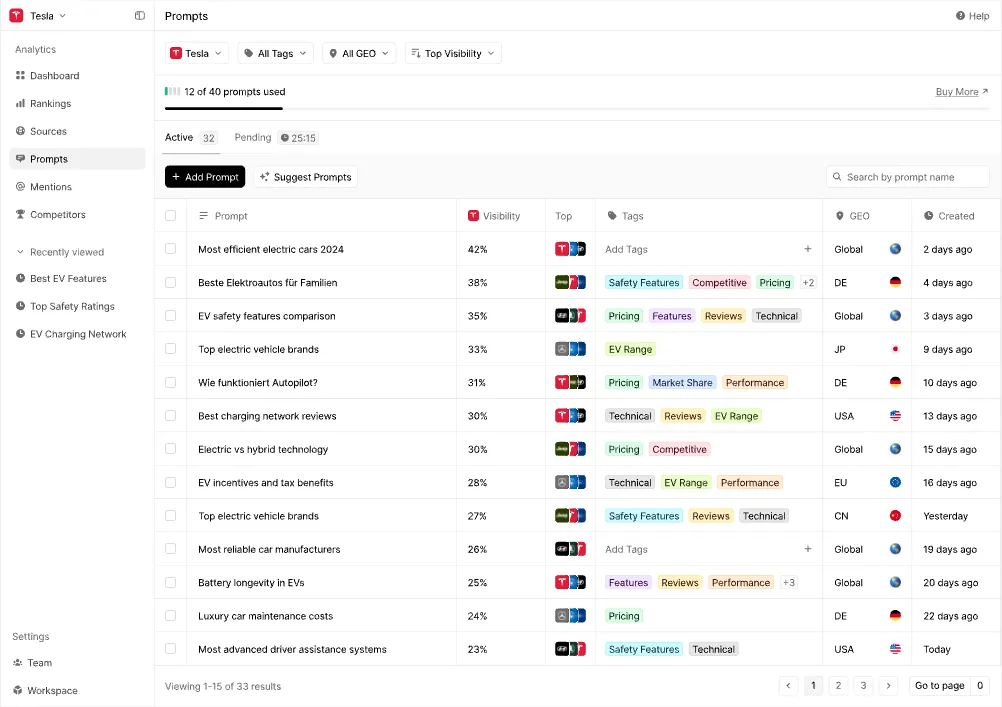
Prompts are the center of Peec AI. Instead of tracking only keywords, you track the actual questions your buyers might ask AI tools.
For example, you may track prompts like “What is the best AI visibility tool for agencies?” or “Which SEO tool is best for GEO optimization?” Peec AI then shows whether your brand appears, which competitors show up, and how your visibility changes across selected AI models.
The part I like here is the suggested prompts feature. It reduces the guesswork, especially if you are still figuring out what buyers may ask inside ChatGPT, Perplexity, Gemini, or Google AI search experiences. Prompt tagging, location-based tracking, and volume signals also make the feature easier to organize.
But I would still treat Peec AI’s prompt tracking as monitoring, not strategy. It helps you see the prompts that matter. Scalenut has the edge if you want to turn prompt gaps into AI-led content ideas, optimization tasks, and execution paths.
a) Visibility
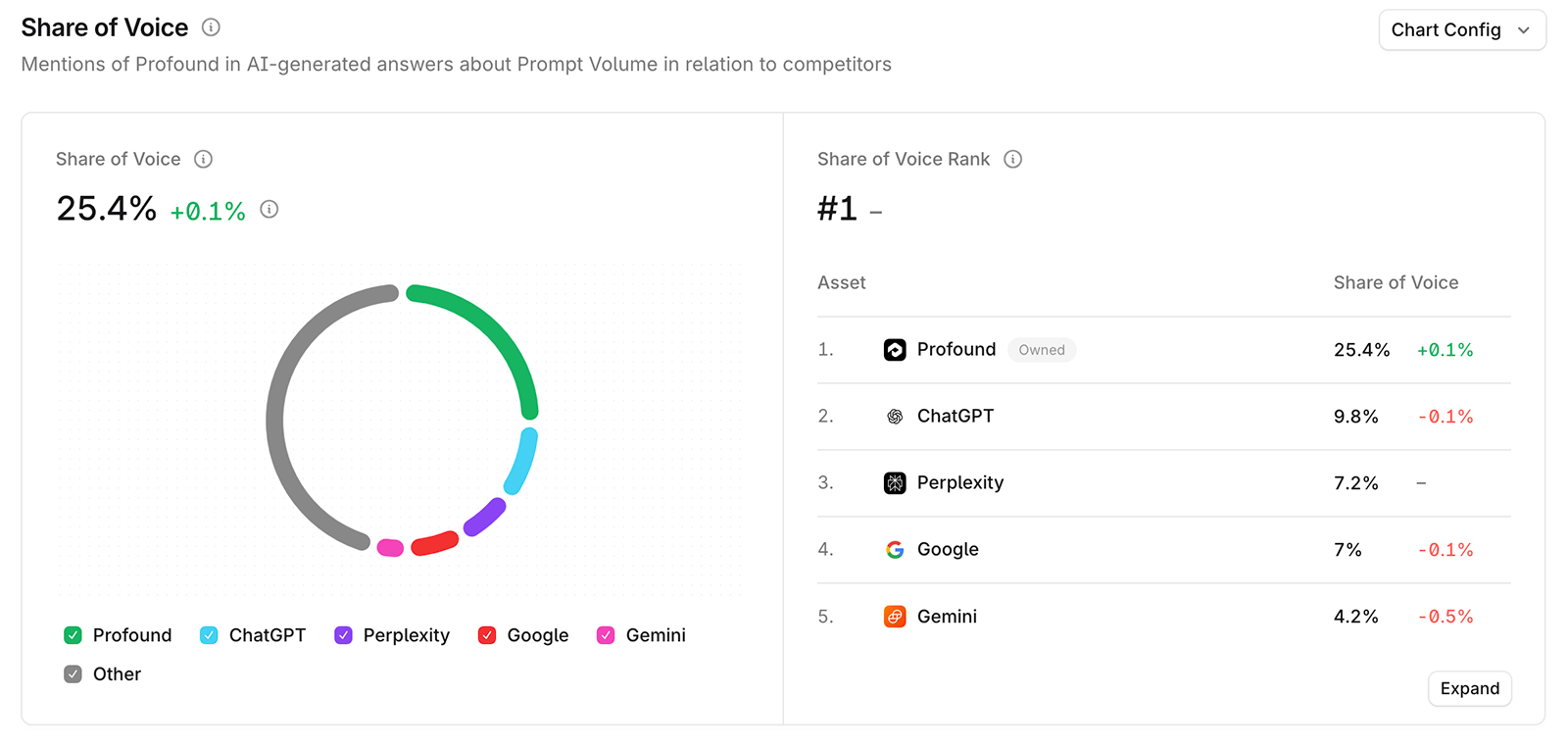
Visibility measures the percentage of AI responses that mention your brand for the prompts you track. Share of voice is a separate metric: it measures your brand’s share of mentions compared with all tracked brands mentioned in those responses.
This is one of the first metrics I would check inside Peec AI because it quickly tells you whether your brand is part of the conversation or completely missing. If your competitors are showing up more often, you can spot that gap without digging too much.
The limitation is that visibility alone does not tell you what to fix. It tells you where you stand. Scalenut’s AI Visibility layer connects brand visibility, share of voice, average position, and competitor signals with recommendations and content execution workflows.
Want to benchmark your AI search presence better? Explore the best tools for tracking brand visibility in AI search platforms.
b) Sentiment
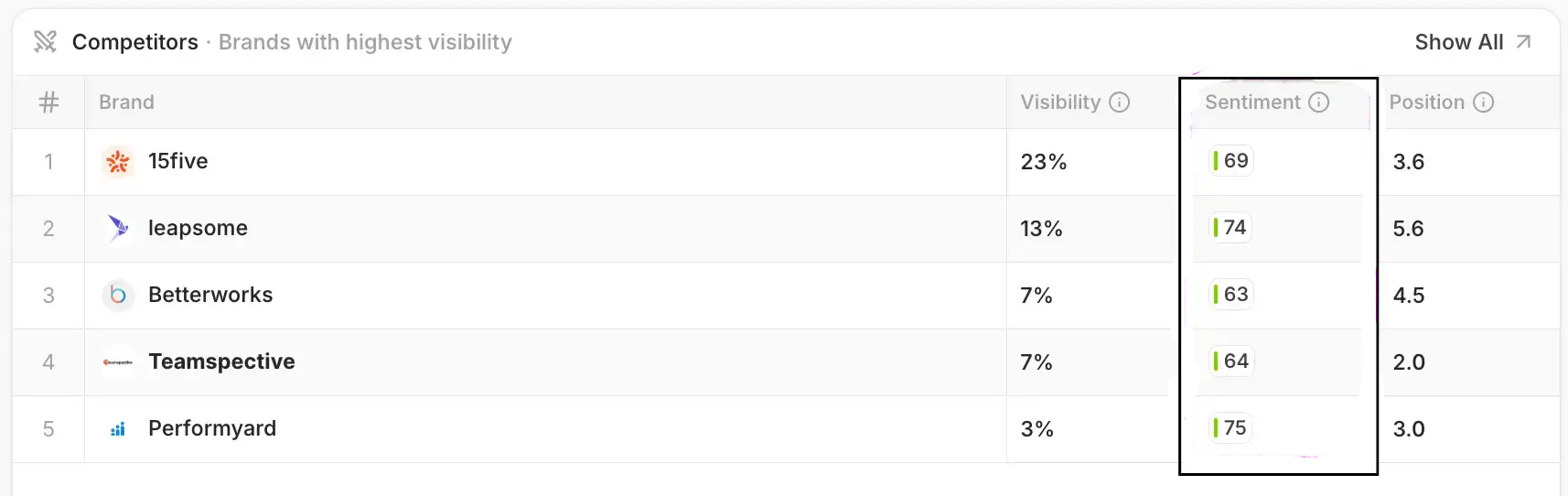
Sentiment shows whether AI platforms describe your brand positively, neutrally, or negatively.
This is useful because being mentioned is not always a win. If AI answers describe your product as expensive, limited, confusing, or weaker than a competitor, that visibility may hurt more than help.
Peec AI makes sentiment easier to track over time, but I would not rely on the score alone. You still need to read the actual answer, check the prompt, and look at the sources shaping that response. The score gives you the signal. The context gives you the real insight.
c) Positions

Positions show your brand’s average ranking in AI responses where it appears, compared with other brands mentioned. Responses where your brand is absent are not included in that average.
I like this Peec.ai feature because it gives more nuance than a simple mention count. Being listed first in an AI answer is very different from being mentioned near the bottom after three competitors.
This is especially helpful for “best tools,” “top platforms,” and comparison-style prompts. I would read position alongside visibility, because ranking near the top when you appear does not tell you how often your brand is missing.
d) Mentions

Mentions show when your brand is directly named in AI responses.
This sounds basic, but it is actually important because AI search has two different visibility problems. Your brand may be mentioned without your website being cited, or your content may be used as a source without your brand being recommended.
That distinction matters. If your site is being used but your brand is not being named, you may have content authority but weak brand association. If your brand is mentioned but your site is not cited, you may need stronger owned content or better source coverage.
e) Volume

Volume helps you prioritize prompts based on relative demand. Peec AI uses a 1–5 score, from very low to very high, to indicate demand for the topics behind your prompts relative to your industry.
I would use this as a directional signal, not as an exact number of searches. It is helpful for deciding which prompts deserve attention first, especially when you are tracking many buyer questions and need to choose where to focus.
For example, a higher-volume prompt where your brand is missing may deserve closer attention than a low-volume prompt where you already show up. But the real value still comes from pairing volume with visibility, position, competitor presence, and business intent.
Want a broader workflow view? Explore which AI monitoring tools can improve your workflow in 2026 and see how different platforms support tracking, insights, and action.
2. Sources
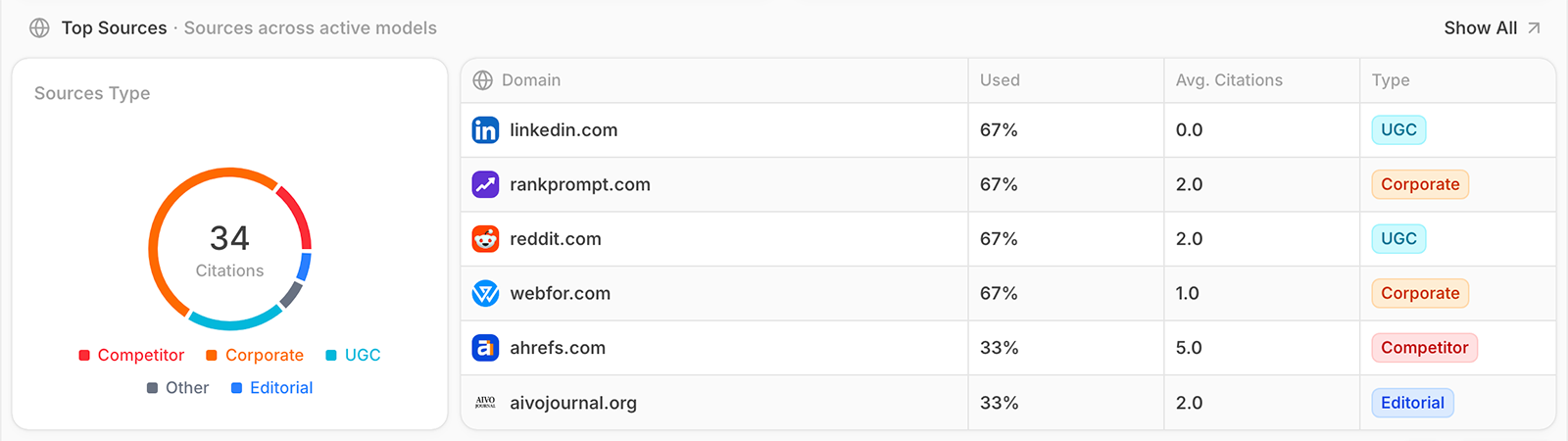
Sources are one of the more valuable parts of Peec AI. This is where you can see which websites, domains, URLs, reviews, articles, communities, or third-party pages AI platforms rely on when generating answers.
I think this is where Peec AI becomes more useful than a simple mention tracker. It does not just tell you that you are missing. It helps you understand what may be shaping the answer.
Peec AI’s Gap Analysis highlights domains and URLs that mention competitors but leave out your brand, among the sources used by AI models. I would use its Gap Scores to prioritize frequently used sources featuring multiple competitors, giving the team clearer targets for outreach, partnerships, or relevant community participation.
For example, if AI tools keep pulling from review sites, Reddit threads, competitor blog posts, editorial lists, or documentation pages, that gives you a clearer idea of where authority is being built. Peec AI is good for spotting those patterns. Scalenut is better if you want those source insights connected to authority recommendations, backlink suggestions, and content actions.
a) Source Categories
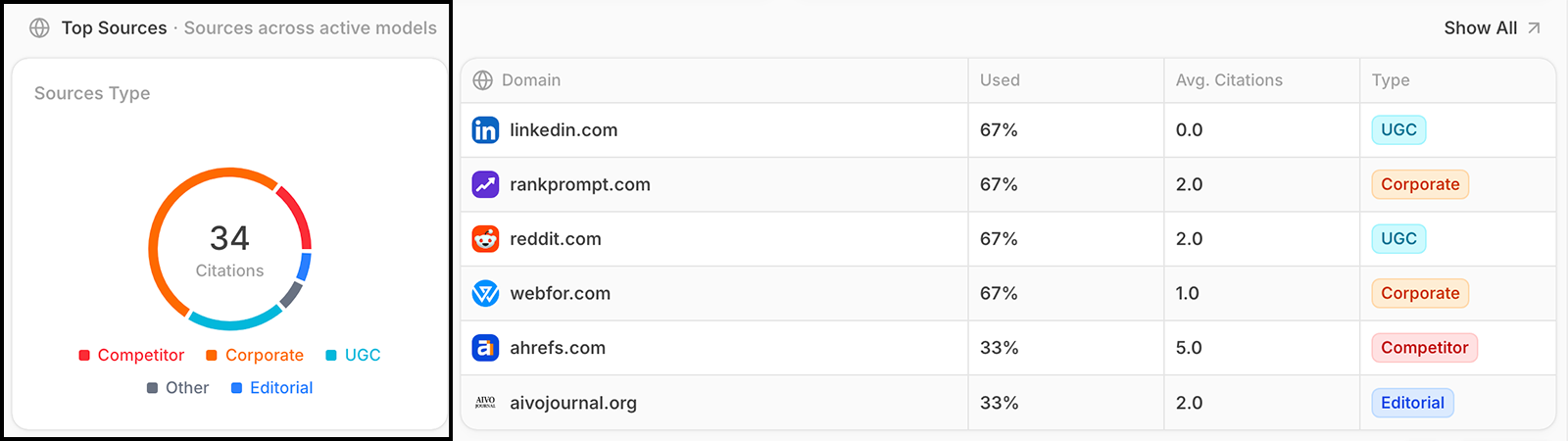
Source categories help you understand the types of content AI platforms trust in your niche.
Peec AI groups sources into categories like corporate, editorial, user-generated content, institutional, reference, competitor, and other source types. I like this because it makes the source data easier to interpret.
If AI platforms rely heavily on editorial content, digital PR may matter more. If user-generated content keeps showing up, Reddit, forums, and community visibility may be part of the problem. If owned websites dominate, improving your own content may have a bigger impact.
This is practical data, but you still need judgment. Peec AI can show the pattern, but your team has to decide whether the next move is content, outreach, reviews, community engagement, or authority building.
b) Source Usage Trends and Source Table Metrics
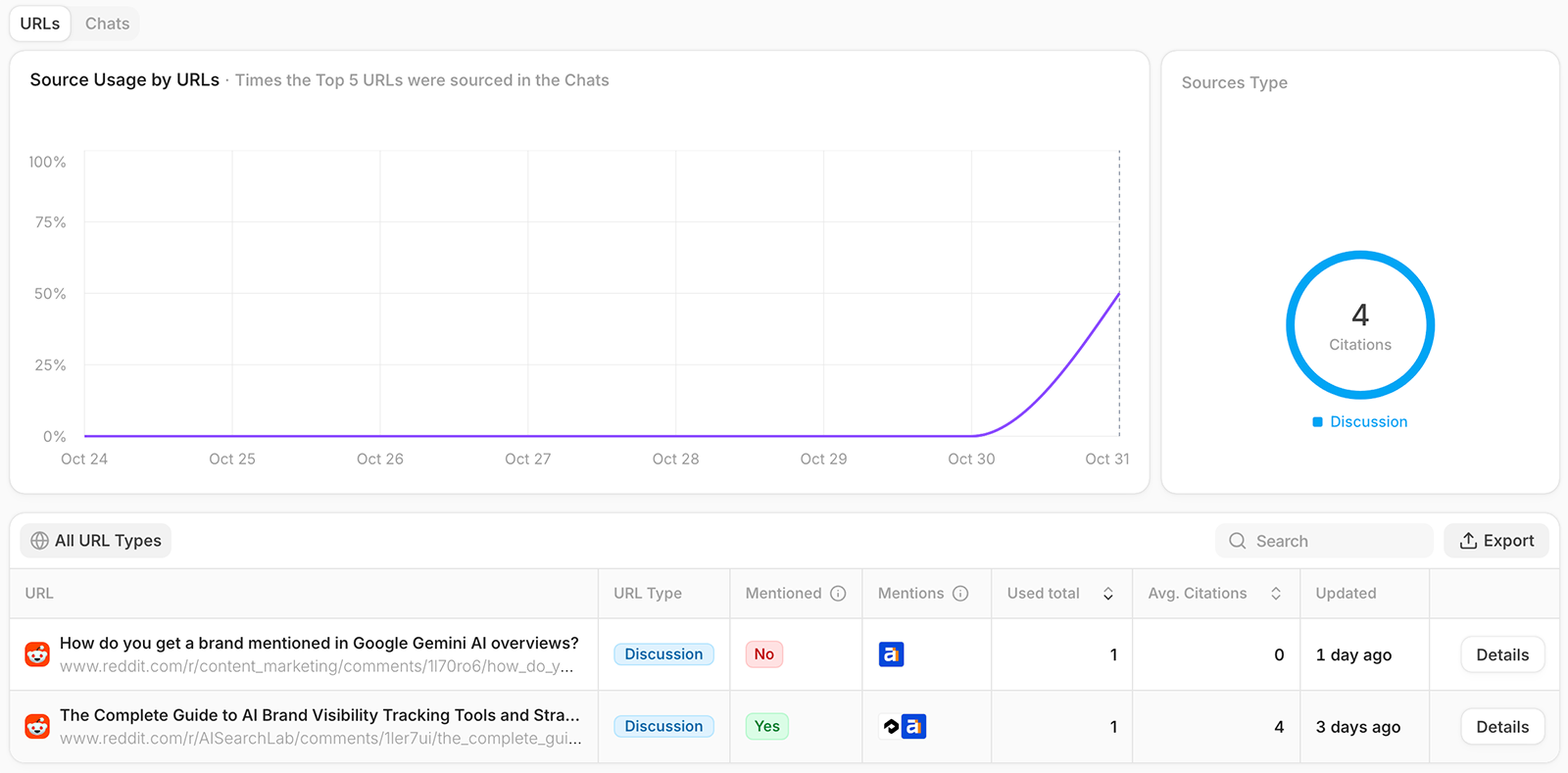
Source usage trends help you see which domains appear consistently in AI answers and which ones show up only occasionally.
This is useful because not every citation matters equally. A source that appears once is interesting. A source that keeps appearing across your most important prompts is a much stronger signal.
The source table can help you review which domains are being retrieved or cited most often. I would use this for content updates, outreach planning, review-site improvements, and competitor research. That said, this is still a feature that needs manual interpretation. The data is useful, but it will not automatically hand you a complete execution plan.
3. Competitors
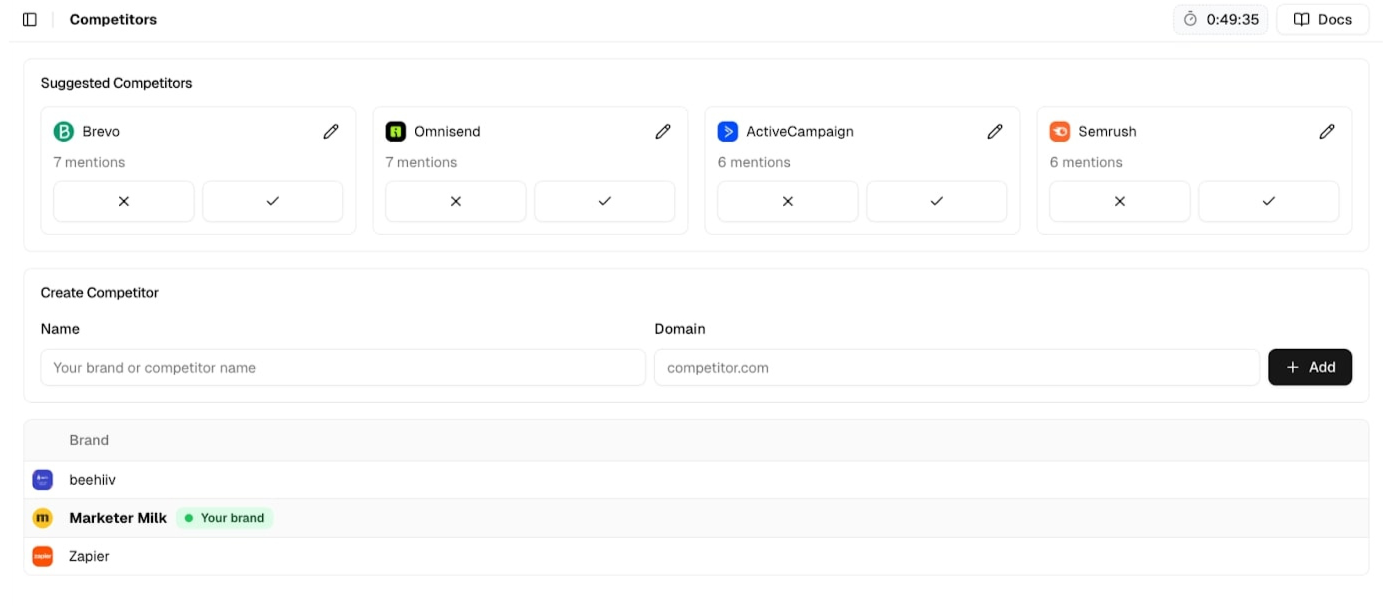
Competitor tracking is one of Peec AI’s strongest use cases. Once you add competitors, the rest of the platform becomes much more useful because AI visibility is always relative.
A 20% visibility score does not mean much until you know whether your closest competitor is at 10%, 40%, or 70%. Peec AI helps you see who is winning prompts, where they appear, and which sources may be helping them.
I like this feature because it gives you a better sense of category presence, not just brand presence. You can see whether competitors are consistently showing up for buying prompts, comparison prompts, and recommendation-style prompts.
Where Scalenut feels more useful is after that discovery. Peec AI can show that a competitor is winning. Scalenut is better if you want to connect that insight to content planning, prompt gaps, topic clusters, and GEO recommendations that help you respond.
4. Actions and optimization recommendations
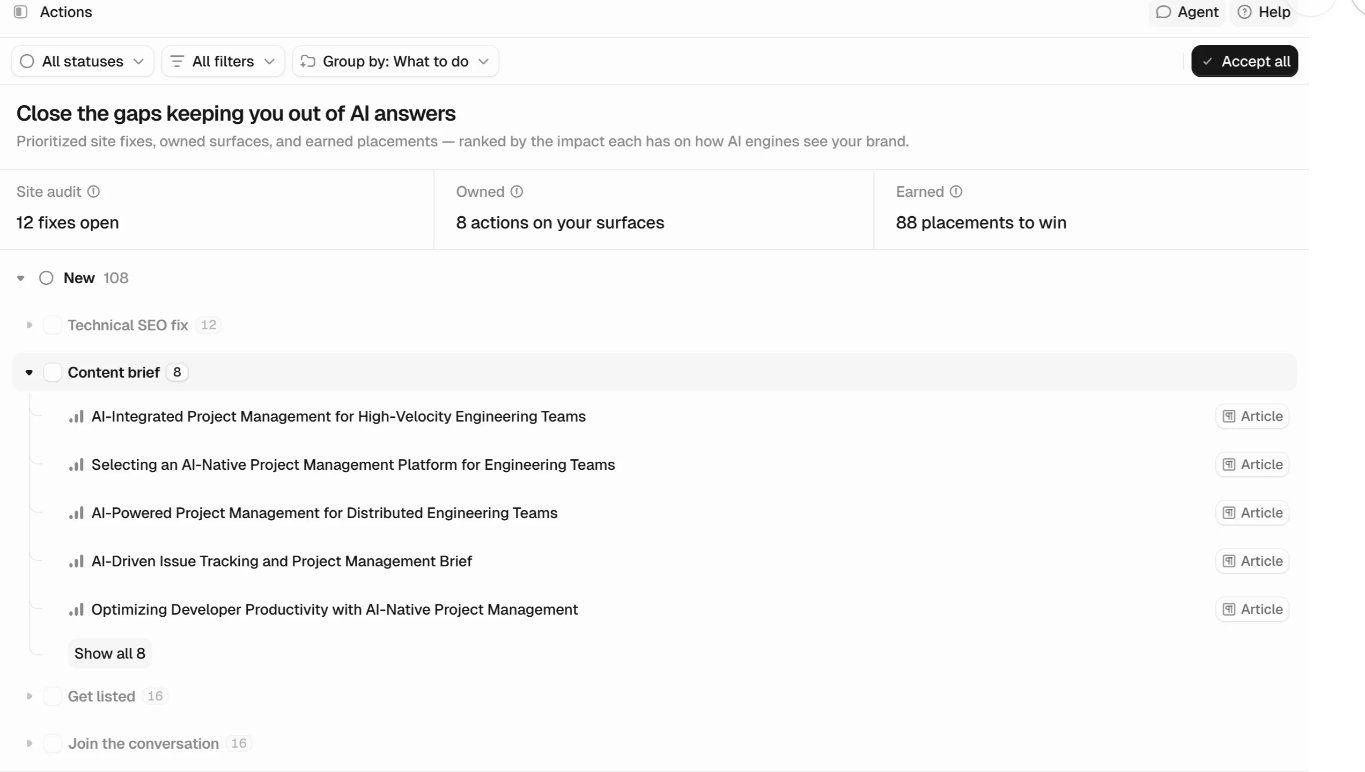
Peec AI’s Actions feature turns prompt and source data into a list of improvements ranked by expected impact. What I find useful here is that recommendations come with supporting evidence, including competitors gaining visibility and the sources contributing to it.
The recommendations sit in three categories:
- Site audit: Technical and accuracy fixes, including issues that affect crawler access.
- Owned: Opportunities to improve content on your website and other channels you manage.
- Earned: Opportunities to gain mentions or placements on third-party sources influencing AI answers.
When a recommendation involves content, its brief can suggest a structure and outline the steps to take. You can also accept, decline, and track actions through completion.
For me, this gives Peec a clearer role in deciding what to work on next. Your team still needs to assess the recommendations, produce the content, implement technical changes, and handle outreach.
5. Agent Analytics and AI referral tracking
Peec AI’s Agent Analytics helps you connect visibility reporting with crawler access and website activity. I would read its three components separately:
- Crawl Insights: Uses server logs to show which AI bots visit your pages, how often, and the status codes they receive.
- Crawlability: Checks robots.txt rules to identify whether AI crawlers are allowed, partially restricted, or blocked.
- AI Referrals: Connects to GA4 to report human visits from AI assistants, including sessions and engagement. Conversions and revenue require the relevant GA4 tracking setup.
What I like here is the distinction between bot visits and human visits. A crawler visit does not prove a citation or a conversion. Referral reporting also has gaps when links do not pass a referrer.
Want to see how your competitors show up in AI search? Explore the best GEO tools for competitor analysis before choosing your stack.
Peec AI Pricing Review: How Much Does Peec AI Cost?
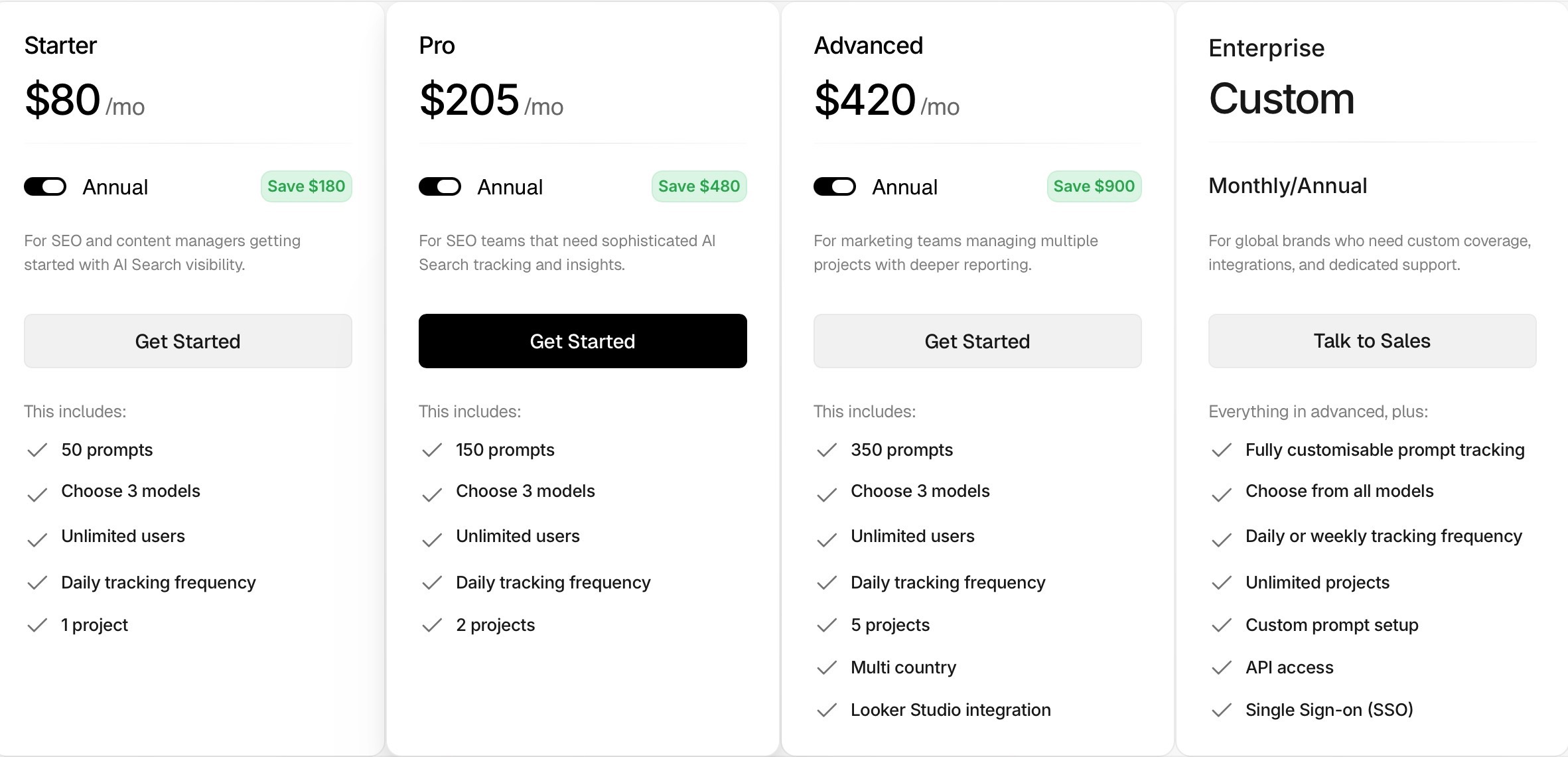
Peec AI’s pricing is clearly meant for teams that are already serious about AI search visibility. When billed yearly, the Starter plan costs $80/month for 50 prompts, the Pro plan costs $205/month for 150 prompts, and the Advanced plan costs $420/month for 350 prompts. If you pay monthly, the pricing is higher.
One thing I do appreciate is that Peec AI keeps the pricing fairly transparent. You can see the prompt limits upfront, and the 7-day free trial with no credit card makes it easier to test the platform before committing.
That said, I would not call Peec AI cheap. If you only want to test GEO tracking lightly, $80/month for 50 prompts may feel like a lot. And if you need to monitor more prompts, more brands, or more AI engines, the cost can climb quickly. It makes sense for teams that already know they need AI search monitoring, but it may not be the easiest starting point for smaller teams.
This is where Scalenut feels easier to justify. Scalenut’s Professional plan is at $80/month and tracks up to 100 prompts, along with GEO content creation, content optimization, keyword clusters, and content audits. In comparison, Peec AI’s annual billing Starter plan gives you 50 prompts at the same $80/month price. So if you want both tracking and execution, Scalenut gives you more room to act on the data instead of only monitoring it.
Looking for a budget-friendly GEO stack? Explore our list the 11 best GEO tools under $100/month for 2026 before choosing the right fit for your team.
Is Peec AI The Right Fit For Your Team?
I would not put Peec AI in the “everyone should try this” category. It is most useful when your team already has a clear idea of what you want to measure in AI search. If you know your priority prompts, competitors, markets, and buyer questions, Peec AI gives you a clean way to track how your brand is showing up.
Peec AI can also help you decide what content to create or refresh. Its Actions feature prioritizes opportunities and provides competitor evidence, suggested content structures, and steps to follow. Your team still needs to evaluate those recommendations, produce and publish content, implement technical fixes, and handle outreach.
Who Should Use Peec AI?
- In-House SEO Teams: A good fit if you want to track whether your brand appears for high-intent AI search prompts and competitor-led questions.
- Agencies: Useful for showing clients how their brand performs across AI prompts, competitors, sources, sentiment, and visibility trends.
- B2B SaaS Teams: Helpful if buyers are likely to ask AI tools for “best software,” “top platforms,” or comparison-style recommendations in your category.
- Brand And PR Teams: Useful for understanding how AI platforms describe your brand and which third-party sources influence that perception.
- Multi-Market Teams: A strong fit if you need to compare AI visibility across different countries, regions, or languages.
Who May Find Peec AI Limited?
- Small Teams Testing GEO: The Peec.ai features pricing may feel high if you are only experimenting with a few prompts or still trying to prove the value of AI visibility tracking. If Peec AI feels too advanced or pricey for your stage, compare this list of the top GEO tools for small businesses in 2026.
- Content Teams Needing Execution Support: Peec AI provides briefs and site-audit recommendations, but your team still needs to research, write, edit, publish, and implement changes.
- Teams Without A Clear GEO Process: The insights are useful, but they can sit unused if no one owns the next step.
- Performance Marketers: Peec AI reports AI referral traffic through GA4, including conversions and revenue when configured. Teams needing a complete view of the customer journey must still account for missing referrers and attribution gaps.
- Teams Wanting One Complete Workflow: If you want tracking, content creation, optimization, audits, internal links, and AI traffic insights in one place, Scalenut may be a better fit.
Are you looking to specifically improve product visibility across search and AI answers? Explore the best GEO tools for ecommerce that actually drive rankings before choosing your stack.
What Are The Pros Of Peec AI?
After going through Peec AI, I can see why teams like it. It does not try to be a giant SEO suite. It stays focused on AI visibility tracking, and that is where it feels strongest.
Let’s first look at the areas where Peec AI actually delivers well.
1. Clean Dashboard
Peec AI makes AI visibility data easier to understand. You can see prompts, mentions, competitors, sources, and visibility trends without digging through too many layers. That simplicity is one of its biggest strengths.
2. Strong Prompt Tracking
I like that Peec AI is built around buyer-style questions, not just keywords. It helps you see where your brand is showing up in real AI search conversations and where competitors are getting mentioned instead.
3. Useful Source Insights
The source data is one of the better parts of Peec AI. It shows which domains, articles, reviews, or third-party pages may be shaping AI answers in your category, which can be useful for content, PR, and outreach decisions.
4. Competitor Benchmarking
Peec AI makes competitor tracking simple. You can quickly see which brands are showing up more often, where they rank, and which prompts they are winning. That makes the data more useful than looking at your brand in isolation.
5. Daily Tracking
The platform runs prompts daily, which is helpful because AI visibility changes often. You are not stuck looking at stale data, and you can spot shifts in visibility, sentiment, and competitor presence faster.
6. Reporting Options
CSV exports, Data Studio, and API access on higher plans make Peec AI useful for teams that need to share visibility data with clients, leadership, or internal stakeholders.
7. Unlimited Seats
I also like that Peec AI includes unlimited users across its main plans. That is useful for agencies and larger teams that do not want per-seat pricing to become another cost problem.
Peec AI’s biggest strength is that it makes AI visibility tracking feel clear and manageable, especially for teams that already know how to act on the data.
Building a complete GEO stack? Explore the 10 best AI tools for generative engine optimization in 2026.
What are the biggest limitations of Peec AI?
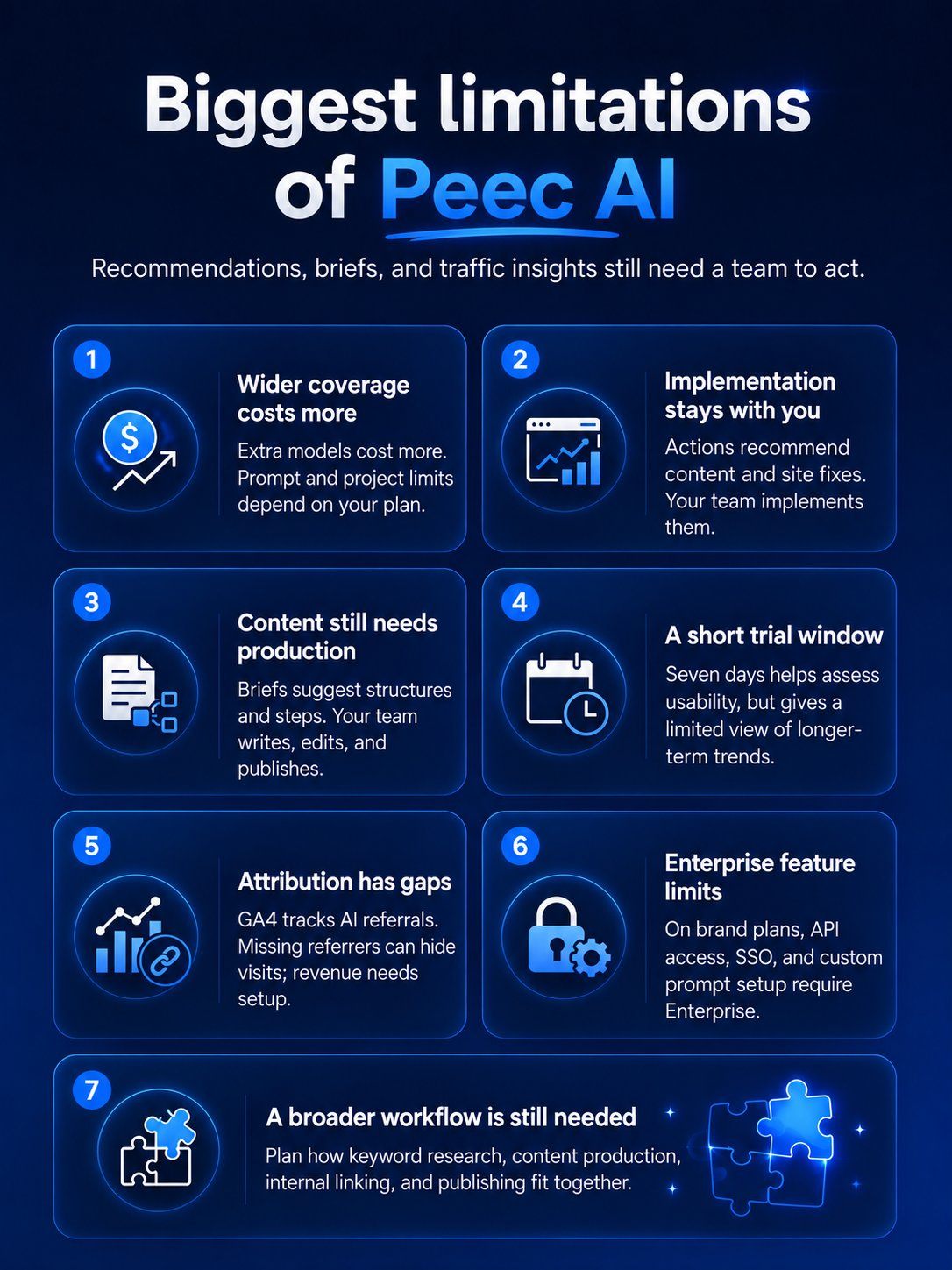
Peec AI goes beyond visibility tracking with prioritized recommendations, content briefs, site-audit suggestions, and traffic reporting. The main limitation is that your team still needs to evaluate and implement the work. That matters if you want one tool to handle your full GEO workflow.
Here are the areas where I think Peec AI may feel limiting, depending on what your team needs.
1. Costs can rise with wider coverage
Peec AI’s self-serve brand plans include three selected models, with additional models available as paid add-ons. More prompts or projects may require a higher plan. I would check the model, prompt, project, and multi-country limits against your needs before judging the price, especially if you manage several brands or markets.
2. Better for monitoring and guidance than implementation
Peec AI’s Actions feature provides recommendations across Site audit, Owned, and Earned categories, including technical fixes that help AI crawlers access your content. However, identifying a fix does not implement it. Your team still needs to make website changes, update pages, and carry out outreach.
3. Limited built-in content production workflow
Actions can provide suggested content structures and step-by-step guidance, so Peec does help bridge the gap between data and planning. The remaining work is production: researching, writing, editing, publishing, and maintaining the content. I would treat its briefs as a starting point that still needs editorial judgment.
4. Short trial window
The 7-day free trial is helpful, and I appreciate that it exists. But one week is better suited to checking setup, dashboard clarity, and recommendation usefulness than judging long-term visibility trends or the impact of content changes.
5. Traffic attribution has measurement gaps
Peec AI’s GA4-based referral reporting includes sessions and engagement, with conversions and revenue available when the relevant tracking is configured. However, visits without a referrer can appear as direct traffic, while Google AI Overviews and AI Mode visits fall under organic search. I would use this reporting alongside broader analytics when assessing AI-assisted customer journeys.
6. Advanced features sit higher up
On Peec’s brand plans, API access, SSO, and custom prompt setup are Enterprise features. I would check these requirements early if your team needs custom data pipelines or tighter access controls, because a plan’s prompt allowance alone does not tell you whether it meets your operational needs.
7. Does not replace your full SEO and GEO workflow
Peec can support visibility analysis, prioritization, and measurement. But if you want keyword planning, article production, on-page optimization, internal linking, and publishing in one workflow, I would assess those requirements separately before treating it as your complete SEO and GEO stack.
Your results will depend on how well your team evaluates the recommendations, completes the work, and measures what changes afterward.
If you want to move beyond tracking, also explore our list of the 11 best LLM optimization tools for improving AI visibility in 2026.
What Is The Best Alternative To Peec AI In 2026?
Peec AI is a good choice if you want a clean, focused way to understand your AI search visibility. It helps you track prompts, brand mentions, competitor visibility, sentiment, positions, and the sources AI platforms rely on. If your team already has a strong SEO process and only needs an AI visibility layer on top, Peec AI can make sense.
But here’s where I would be careful. Tracking visibility is useful, but it is not the same as improving it. Once you find the prompts where your brand is missing, you still need to decide what content to create, which pages to refresh, what sources to strengthen, and how to turn those insights into actual search and generative engine optimization gains.
That is where Scalenut becomes the better fit for many teams. It connects AI visibility tracking with content planning, GEO content creation, optimization, audits, internal linking, Reddit insights, and AI traffic monitoring. So instead of only seeing where you stand, you get a workflow that helps you act on the gaps.
Want to compare more options before deciding? Explore the top 10 Peec AI alternatives for tracking and improving AI visibility.
When Should You Choose Peec AI?
Choose Peec AI if you mainly need:
- AI Visibility Monitoring: You want to track how often your brand appears in AI-generated answers.
- Prompt Tracking: You want to see which buyer questions mention your brand, skip your brand, or favor competitors.
- Competitor Benchmarking: You want to compare visibility, sentiment, and position against other brands in your space.
- Reporting And Exports: You need to share AI visibility data with your team, clients, or leadership.
Peec AI works best when your team already knows what to do with the data. It is a strong analytics layer, but it expects you to bring the content strategy.
Managing AI visibility for multiple clients? Explore the best AI visibility tools for marketing agencies to find a platform that makes tracking, reporting, and action easier.
When Is Scalenut A Better Fit?
Scalenut is the better choice if you do not want AI visibility data sitting in a dashboard without a clear next step.
It is built for teams that want to track visibility, then move straight into content action. You can plan topics, create GEO-ready articles, optimize existing pages, audit underperforming content, improve internal links, monitor Reddit conversations, and track AI bot activity from one workflow.
That makes Scalenut a stronger fit for content teams, SEO teams, agencies, and growth teams that want to improve AI visibility, not just report on it.
Ready to stop just tracking AI visibility and start improving it? Book a demo today to see exactly where your brand is missing and what to fix next.
Peec AI Vs Scalenut: Which Tool Is Better For GEO?

Peec AI and Scalenut are not really built for the same kind of user. Peec AI is great if you want to understand how your brand appears in AI search. It gives you a clean view of prompts, mentions, competitors, sentiment, positions, and sources.
But if I were choosing a tool for a team that needs to improve visibility, not just watch it, I would lean toward Scalenut. Peec AI gives you the picture. Scalenut gives you more of the working plan behind that picture.
Here are the Scalenut key features worth considering:
- AI visibility and brand monitoring: Track visibility, share of voice, average position, and heatmaps to compare your brand’s presence against competitors.
- Prompt and competitor insights: Review prompt coverage, citations, sentiment, and query fanouts to identify gaps in how AI platforms mention your brand.
- GEO recommendations and content execution: Get content and authority recommendations, then use built-in writing, optimization, auditing, and internal linking tools to act on them.
- AI Traffic Monitor: Connect Cloudflare to distinguish AI crawler activity from human referrals and monitor page activity and traffic trends.
Peec AI Review: My Final Thoughts
My verdict: Peec AI is a strong fit for teams that want to track visibility across answer engines, compare competitors, and identify top citation sources. Its recommendations, briefs, and site-audit guidance help prioritize improvements, while your team handles implementation. Choose it when you already have a content and SEO process ready to act on those insights.
For a broader workflow in the age of AI search engines, Scalenut is worth considering. It combines visibility tracking with content creation, optimization, audits, and internal linking to support performance across AI answers and traditional search results. Book a free strategy call to see whether that workflow fits your team.
Frequently Asked Questions
What do Peec AI search visibility reviews say about the platform?
G2 feedback highlights straightforward setup, an intuitive interface, and responsive support. Some reviews raises model-access costs, while others ask for deeper source insights. These dated experiences should be considered alongside Peec’s current features.
Can Peec AI track visibility for multiple websites or projects?
Yes, depending on your plan. Peec’s brand plans include 1 project on Starter, 2 on Pro, and 5 on Advanced. Prompts can be allocated across projects within account limits. Agencies can also choose separate bundles designed for managing multiple clients.
What does Peec AI actually track?
Peec AI tracks brand visibility, share of voice, sentiment, average position, competitors, and sources across selected AI platforms. Agent Analytics separately covers AI crawler activity, crawlability checks, and human referral traffic through GA4, with conversions and revenue available when configured.
Is Peec AI worth it for content marketing teams in 2026?
Peec is worth considering for teams that need visibility tracking, content recommendations, and briefs. Its documentation also lists early-access content optimization tools. Assess availability in your account, along with how your team will review, publish, and measure the resulting changes.
What are the main limitations of Peec AI?
Peec’s recommendations still require team implementation, and it does not replace a complete content production workflow. Model add-ons and plan limits can increase costs. Referral attribution can miss visits without referrers, while conversion and revenue reporting depend on GA4 configuration.
Does Peec AI help improve SEO rankings?
Peec AI can inform SEO and GEO decisions by identifying content gaps, source opportunities, and crawlability issues. It does not control Google rankings. Any improvement depends on the changes your team implements, their quality, and how search platforms respond.
What is the best Peec AI alternative in 2026?
Scalenut is worth considering if you want AI visibility tracking alongside article creation, keyword planning, optimization, audits, and internal linking. Compare the content tools, tracking frequency, model coverage, and plan limits you need before deciding which platform offers better value.
Does Peec AI offer reporting integrations?
Yes. Peec supports CSV exports, Looker Studio reporting, API access, and MCP connections, with availability varying by plan. Its current brand pricing lists Looker Studio from Advanced and API access on Enterprise. GA4 integration supports AI referral reporting.
Does Peec AI deliver on its promise of enhanced AI visibility for websites?
Peec provides tools to measure visibility and prioritize improvements, including source-gap analysis, content briefs, and technical recommendations. Those features can guide useful changes, but they do not guarantee more mentions or traffic. Results depend on execution and changing AI responses.
Is Peec AI suitable for small businesses or only larger marketing teams?
Peec can suit small businesses with clear buyer questions, relevant competitors, and capacity to act on recommendations. Existing search traffic is not a requirement. Assess whether Starter’s 50 prompts, three selected models, and one project justify the cost for your needs.


.svg)


.webp)